2016.0202
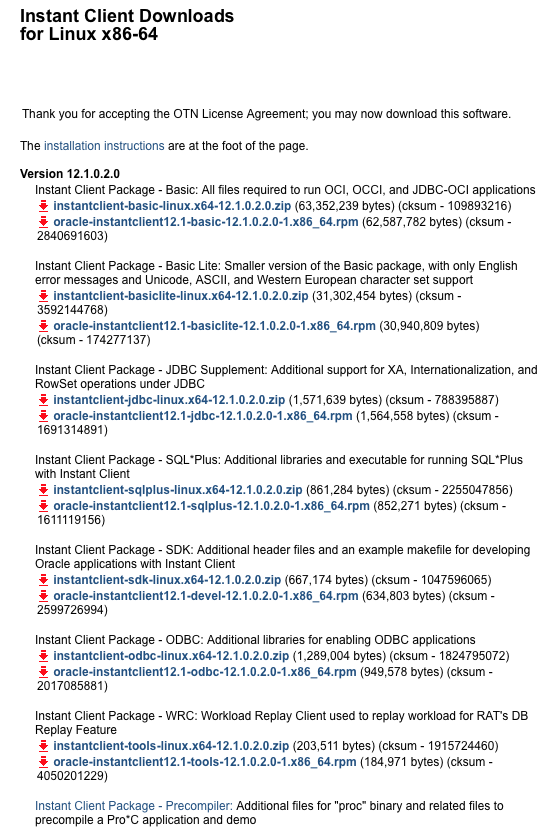
-rw-r–r–@ 1 rimmon staff 62587782 8 2 2014 oracle-instantclient12.1-basic-12.1.0.2.0-1.x86_64.rpm
-rw-r–r–@ 1 rimmon staff 634803 8 2 2014 oracle-instantclient12.1-devel-12.1.0.2.0-1.x86_64.rpm
-rw-r–r–@ 1 rimmon staff 852271 8 2 2014 oracle-instantclient12.1-sqlplus-12.1.0.2.0-1.x86_64.rpm
// 2016.0202 —-
裝 pecl/oci8 command:
pecl install oci8-2.0.10
2013.1225 added
3 apt-get install alien
6 apt-get install nfs-common
8 apt-get install sshfs
// —— INSTALL LAMP
apt-get install apache2 libapache2-mod-php5 php5 php5-dev php5-gd php5-mysql php5-memcache memcached php-pear
————————-
2011.0530 整理的 install step by step:
OS : uname -a
Linux ubuntu 2.6.38-8-server #42-Ubuntu SMP Mon Apr 11 03:49:04 UTC 2011 x86_64 x86_64 x86_64 GNU/Linux
Oracle client : 11.2 R1
google "oracle instant client download"
到 oracle 網頁找 Instant Client for Linux x86-64 / Version 11.2.0.1.0 (PS: Version 11.2.0.2.0 這版有問題)
download 這兩個
oracle-instantclient11.2-basic-11.2.0.1.0-1.x86_64.rpm (47,811,007 bytes)
oracle-instantclient11.2-devel-11.2.0.1.0-1.x86_64.rpm (606,343 bytes)
用 alien 裝起來
  102  alien -i *basic*
  103  alien -i *devel*

新增這個檔 /etc/ld.so.conf.d/oracle.conf , 內容:
/usr/lib/oracle/11.2/client64/lib/

  104  cat /etc/ld.so.conf.d/oracle.conf
  105  ls -l /usr/lib/oracle/
  106  ls -l /usr/lib/oracle/11.2/client64/lib/

安裝 LAMP :
  108  export http_proxy="http://172.30.1.123:8080"
  109  apt-get install apache2 libapache2-mod-php5 php5 php5-dev php5-gd mysql-server php5-mysql

安裝 libaio 套件
  138  apt-get install libaio1

安裝 pear 套件
  112  apt-get install php-pear

安裝 pecl 的 oci8 套件
pear config-set http_proxy http://172.30.1.123:8080/

  114  pecl update-channels
  115  pecl install oci8

  117  find /etc -name php.ini
這兩個檔要加入 oci8 的 extentsion
/etc/php5/cli/php.ini
/etc/php5/apache2/php.ini

install ok: channel://pecl.php.net/oci8-1.4.5
configuration option "php_ini" is not set to php.ini location
You should add "extension=oci8.so" to php.ini <------ 加這行

跑看看測試code:

$conn = oci_connect('oracle_user', 'oracle_pass', 'ip_address/instant_id');

$stid = oci_parse($conn, "select to_char(sysdate, 'YYYY-MM-DD HH24:MI:SS') from dual" );
oci_execute($stid);

$row = oci_fetch_array($stid, OCI_ASSOC+OCI_RETURN_NULLS);
print_r( $row );

oci_close( $conn );
// ——————————–
以下是 2011.5.25 修改
   69  find / -name sqlplus -print
   70  /usr/lib/oracle/11.2/client64/bin/sqlplus
   71  cat > /etc/ld.so.conf.d/oracle.conf

   73  ls -l /usr/lib/oracle/11.2/client64/lib/

   76  vi /etc/ld.so.conf.d/oracle.conf
   77  apt-get install apache2 libapache2-mod-php5 php5 php5-gd mysql-server php5-mysql

   86  apt-get install php-pear

   91  pear config-set http_proxy http://172.30.1.123:8080/
   92  pecl update-channels

   95  pecl install oci8
2010.0630 : 今天又在 debian 裝一次 發現, 這個版本沒辦法裝 oracle-instantclient11.2.* , 所以繼續用 instantclient11.1.*
Ubuntu 安裝 RPM 要用 alien …
sudo apt-get install alien
Ref. https://help.ubuntu.com/community/HowToBuildToraWithOracle
先去 http://www.oracle.com/technology/software/tech/oci/instantclient/htdocs/linuxsoft.html
download 這幾個 files (rpm)
Instant Client Package – Basic Lite
oracle-instantclient11.1-basiclite-11.1.0.7.0-1.i386.rpm
Instant Client Package – SQL*Plus
oracle-instantclient11.1-sqlplus-11.1.0.7.0-1.i386.rpm
Instant Client Package – SDK
oracle-instantclient11.1-devel-11.1.0.7.0-1.i386.rpm
下 alien 指令安裝 rpm
alien -i oracle-instantclient11.1-basiclite-11.1.0.7.0-1.i386.rpm
alien -i oracle-instantclient11.1-sqlplus-11.1.0.7.0-1.i386.rpm
alien -i oracle-instantclient11.1-devel-11.1.0.7.0-1.i386.rpm
裝好後用 sqlplus 聯看看 , 因為我得到一個 lib error
所以我要裝 apt-get install libaio1
在 /etc/ld.so.conf.d 加一個檔 cat > /etc/ld.so.conf.d/oracle.conf
內容是 oracle lib 的 path /usr/lib/oracle/11.1/client/lib
然後
apt-get install php5
apt-get install php5-dev
因為 oci8 是由 pecl 來安裝的, 所以要 apt-get install php-pear
再來裝 oci8 : pecl install oci8
在 /etc/php5/conf.d 下建一個 oci8.ini 檔 , cat > /etc/php5/conf.d/oci8.ini 內容是
extension=oci8.so
重新啟動 apache2 :
service apache2 restart
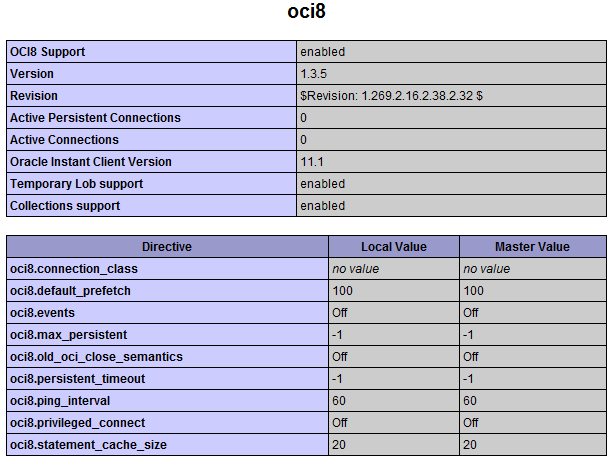
看看 phpinfo 有沒有出現 oci8 等字樣就 ok 了

加一個 virtual host :
在 /etc/apache2/sites-enabled 增加一個 xxx.conf 檔
CodeIgniter 需要用 rewrite module :
ls -sf /etc/apache2/mods-available/rewrite.load /etc/apache2/mods-enabled