Archive for May 2010
使用 mysql partition table sample
Mysql server version:
mysql> show variables like '%version%'; +--------------------------+------------------------------+ | Variable_name | Value | +--------------------------+------------------------------+ | protocol_version | 10 | | version | 5.1.46-community | | version_comment | MySQL Community Server (GPL) | | version_compile_machine | x86_64 | | version_compile_os | unknown-linux-gnu | +--------------------------+------------------------------+ 9 rows in set (0.01 sec)
Check things…
mysql> show variables like '%inno%'; +-----------------------------------------+------------------------+ | Variable_name | Value | +-----------------------------------------+------------------------+ | have_innodb | YES | mysql> show variables like '%part%'; +-------------------+-------+ | Variable_name | Value | +-------------------+-------+ | have_partitioning | YES |
my schema:
-- CREATE TABLE `tbl_ts_ip` ( `xdate` int(8) NOT NULL default 0, `xhour` varchar(2) NOT NULL default '00', `tag1` varchar(100) NOT NULL default '', `tag2` varchar(300) NOT NULL default '', `val` int(10) unsigned NOT NULL default '0', KEY `ndx_xdate` (`xdate`), KEY `ndx_xhour` (`xhour`), KEY `ndx_tag1` (`tag1`), KEY `ndx_tag2` (`tag2`) ) ENGINE=InnoDB partition by range(xdate) ( partition p201003 values less than (20100400), partition p201004 values less than (20100500), partition p201005 values less than (20100600), partition p201006 values less than (20100700) );
testing
-- insert into tbl_ts_ip values (20100301,'01','tag1','tag2',1); insert into tbl_ts_ip values (20100401,'01','tag1','tag2',1); insert into tbl_ts_ip values (20100501,'01','tag1','tag2',1); insert into tbl_ts_ip values (20100601,'01','tag1','tag2',1); insert into tbl_ts_ip values (20100701,'01','tag1','tag2',1); --
result:
-- mysql> insert into tbl_ts_ip values (20100301,1,'tag1','tag2',1); Query OK, 1 row affected (0.00 sec) mysql> insert into tbl_ts_ip values (20100401,1,'tag1','tag2',1); Query OK, 1 row affected (0.00 sec) mysql> insert into tbl_ts_ip values (20100501,1,'tag1','tag2',1); Query OK, 1 row affected (0.00 sec) mysql> insert into tbl_ts_ip values (20100601,1,'tag1','tag2',1); Query OK, 1 row affected (0.00 sec) mysql> insert into tbl_ts_ip values (20100701,1,'tag1','tag2',1); ERROR 1526 (HY000): Table has no partition for value 20100701 mysql> select * from tbl_ts_ip; +----------+-------+------+------+-----+ | xdate | xhour | tag1 | tag2 | val | +----------+-------+------+------+-----+ | 20100301 | 1 | tag1 | tag2 | 1 | | 20100401 | 1 | tag1 | tag2 | 1 | | 20100501 | 1 | tag1 | tag2 | 1 | | 20100601 | 1 | tag1 | tag2 | 1 | +----------+-------+------+------+-----+ 4 rows in set (0.00 sec) --
data files :
[root@ stat]# ls -l total 676 -rw-rw---- 1 mysql mysql 65 May 18 17:02 db.opt -rw-rw---- 1 mysql mysql 8682 May 18 17:07 tbl_ts_ip.frm -rw-rw---- 1 mysql mysql 52 May 18 17:07 tbl_ts_ip.par -rw-rw---- 1 mysql mysql 163840 May 18 17:09 tbl_ts_ip#P#p201003.ibd -rw-rw---- 1 mysql mysql 163840 May 18 17:09 tbl_ts_ip#P#p201004.ibd -rw-rw---- 1 mysql mysql 163840 May 18 17:09 tbl_ts_ip#P#p201005.ibd -rw-rw---- 1 mysql mysql 163840 May 18 17:09 tbl_ts_ip#P#p201006.ibd
add partitions:
-- alter table tbl_ts_ip add partition ( partition p201007 values less than (20100800), partition p201008 values less than (20100900), partition p201009 values less than (20101000), partition p201010 values less than (20101100), partition p201011 values less than (20101200), partition p201012 values less than (20110100) ); --
explain partitions:
-- mysql> explain partitions select * from tbl_ts_ip where xdate=20100501; +----+-------------+-----------+------------+------+---------------+-----------+---------+-------+------+-------+ | id | select_type | table | partitions | type | possible_keys | key | key_len | ref | rows | Extra | +----+-------------+-----------+------------+------+---------------+-----------+---------+-------+------+-------+ | 1 | SIMPLE | tbl_ts_ip | p201005 | ref | ndx_xdate | ndx_xdate | 4 | const | 1 | | +----+-------------+-----------+------------+------+---------------+-----------+---------+-------+------+-------+ -- -- -- mysql> explain partitions select * from tbl_ts_ip where xdate>20100101 and xdate<20100501 and xhour=1 and tag1='x1' and tag2='x2'; +----+-------------+-----------+-------------------------+------+---------------------------------------+-----------+---------+-------+------+-------------+ | id | select_type | table | partitions | type | possible_keys | key | key_len | ref | rows | Extra | +----+-------------+-----------+-------------------------+------+---------------------------------------+-----------+---------+-------+------+-------------+ | 1 | SIMPLE | tbl_ts_ip | p201003,p201004,p201005 | ref | ndx_xdate,ndx_xhour,ndx_tag1,ndx_tag2 | ndx_xhour | 4 | const | 3 | Using where | +----+-------------+-----------+-------------------------+------+---------------------------------------+-----------+---------+-------+------+-------------+ --
######################
sample schema:
create table t1 (
d date
) engine=innodb partition by range ( to_days(d) ) (
partition p1 values less than (to_days(’1999-01-01′)),
partition p2 values less than (to_days(’2000-01-01′))
);
– drop old partition
alter table tablename
drop partition p1;
######
-- CREATE TABLE `tbl_ts_ip` ( `xdate` int(8) NOT NULL default 0, `xhour` int(2) NOT NULL default 0, `tag1` varchar(100) NOT NULL default '', `tag2` varchar(300) NOT NULL default '', `val` int(10) unsigned NOT NULL default '0', KEY `ndx_xdate` (`xdate`), KEY `ndx_xhour` (`xhour`), KEY `ndx_tag1` (`tag1`), KEY `ndx_tag2` (`tag2`) ) ENGINE=InnoDB partition by range(xdate) ( partition p200901 values less than (20090200), partition p200902 values less than (20090300), partition p200903 values less than (20090400), partition p200904 values less than (20090500), partition p200905 values less than (20090600), partition p200906 values less than (20090700), partition p200907 values less than (20090800), partition p200908 values less than (20090900), partition p200909 values less than (20091000), partition p200910 values less than (20091100), partition p200911 values less than (20091200), partition p200912 values less than (20100100), partition p201001 values less than (20100200), partition p201002 values less than (20100300), partition p201003 values less than (20100400), partition p201004 values less than (20100500), partition p201005 values less than (20100600), partition p201006 values less than (20100700), partition p201007 values less than (20100800), partition p201008 values less than (20100900), partition p201009 values less than (20101000), partition p201010 values less than (20101100), partition p201011 values less than (20101200), partition p201012 values less than (20110100), partition p201101 values less than (20110200), partition p201102 values less than (20110300), partition p201103 values less than (20110400), partition p201104 values less than (20110500), partition p201105 values less than (20110600), partition p201106 values less than (20110700), partition p201107 values less than (20110800), partition p201108 values less than (20110900), partition p201109 values less than (20111000), partition p201110 values less than (20111100), partition p201111 values less than (20111200), partition p201112 values less than (20120100) ); --
###
一天一個 partition …
--
CREATE TABLE `tbl_ts_ip` (
`xdate` date NOT NULL DEFAULT '0000-00-00',
`xhour` int(2) NOT NULL DEFAULT '0',
`tag1` varchar(100) NOT NULL DEFAULT '',
`tag2` varchar(300) NOT NULL DEFAULT '',
`val` int(10) unsigned NOT NULL DEFAULT '0',
KEY `ndx_xdate` (`xdate`)
) ENGINE=InnoDB DEFAULT CHARSET=utf8
PARTITION BY RANGE ( to_days(xdate) )
(PARTITION p0 VALUES LESS THAN ( to_days('2005-1-1') ) );
--
--
alter table tbl_ts_ip
add partition (
partition p20100401 values less than ( to_days('20100401')+1 )
);
--
###
產生 alter table … add partition 的 code
$start_date = mktime( 0,0,0,4,1,2010);
$day_count = 365;
for ( $i=0; $i < $day_count; $i++ ) {
echo "
alter table tbl_ts_ip
add partition (
partition p".date("Ymd",$start_date)." values less than ( to_days('".date("Ymd",$start_date)."')+1 )
);
";
echo "
alter table tbl_ts_member
add partition (
partition p".date("Ymd",$start_date)." values less than ( to_days('".date("Ymd",$start_date)."')+1 )
);
";
$start_date += 86400;
}
###
--
mysql> explain partitions select * from tbl_ts_ip where xdate>20100510 and xdate<20100517 and tag2='114.39.237.77'\G
*************************** 1. row ***************************
id: 1
select_type: SIMPLE
table: tbl_ts_ip
partitions: p0,p20100511,p20100512,p20100513,p20100514,p20100515,p20100516
type: ALL
possible_keys: ndx_xdate
key: NULL
key_len: NULL
ref: NULL
rows: 37706064
Extra: Using where
1 row in set (0.01 sec)
mysql> select * from tbl_ts_ip where xdate>20100510 and xdate<20100517 and tag2='114.39.237.77';
+------------+-------+--------------------+---------------+-----+
| xdate | xhour | tag1 | tag2 | val |
+------------+-------+--------------------+---------------+-----+
| 2010-05-16 | 23 | 37043600380A380C3E | 114.39.237.77 | 2 |
+------------+-------+--------------------+---------------+-----+
1 row in set (24.26 sec)
--
###
| Oracle partition table | MySQL partition table |
|
Oracle 說 partition 的好處是…
Partitioning is transparent to existing applications and standard DML statements run against partitioned tables. However, an application can be programmed to take advantage of partitioning by using partition-extended table or index names in DML. You can use SQL*Loader and the import and export utilities to load or unload data stored in partitioned tables. These utilities are all partition and subpartition aware. |
two main advantages are: Increased performance – during scan operations, the MySQL optimizer knows what partitions contain the data that will satisfy a particular query and will access only those necessary partitions during query execution. For example, a million row table may be broken up into ten different partitions in range style so that each partition contains 100,000 rows. If a query is issued that only needs data from one of the partitions, and a table scan operation is necessary, only 100,000 rows will be accessed instead of a million. Obviously, it is much quicker for MySQL to sample 100,000 rows than one million so the query will complete much sooner. The same benefit is derived should index access be possible as local partitioned indexes are created for partitioned tables. Finally, it is possible to stripe a partitioned table across different physical drives by specifying different file system/directory paths for specific partitions. This allows physical I/O contention to be reduced when multiple partitions are accessed at the same time.
|
| ref: MySQL partitions tutorial , http://www.slideshare.net/datacharmer/mysql-partitions-tutorial download: http://dn.monster.tw/my/docs/mysql/partitionstutorial-090426130303-phpapp02.pdf |
—
用 mysql partition table 要注意的事:
Check resources!
- InnoDB
check disk space (uses more than MyISAM)check CPU usage
- MyISAM
use 2 file handles per partitionIf you use more than one partitioned table, count total file handles
- Archive
check CPU usagecheck memory usage
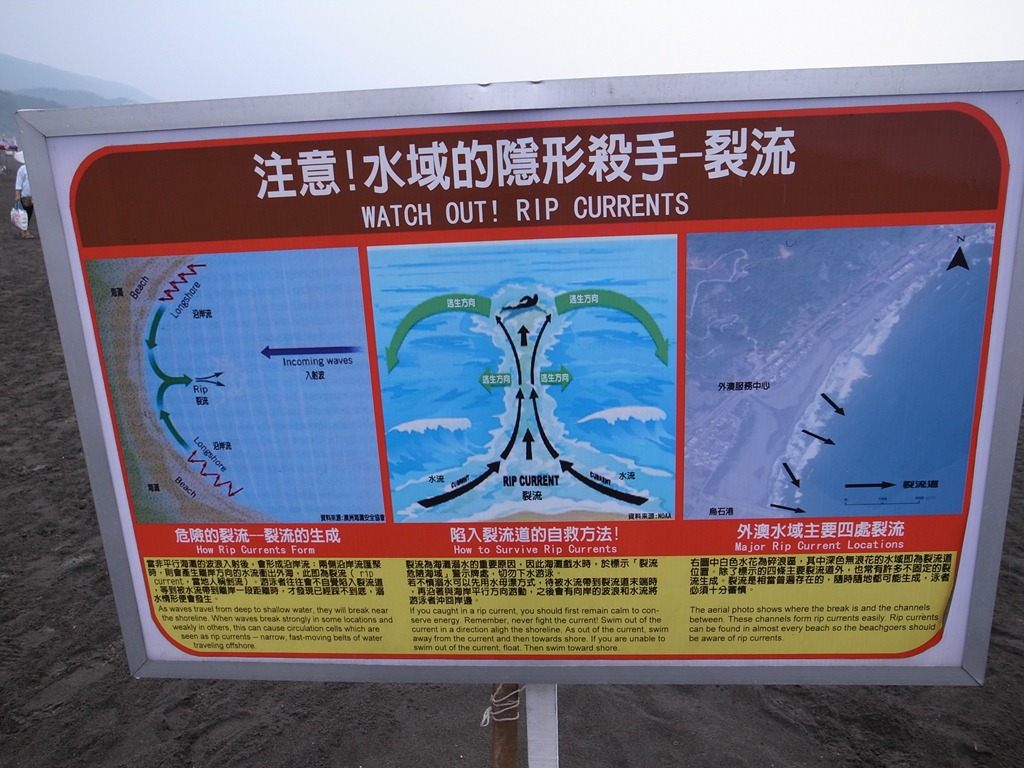
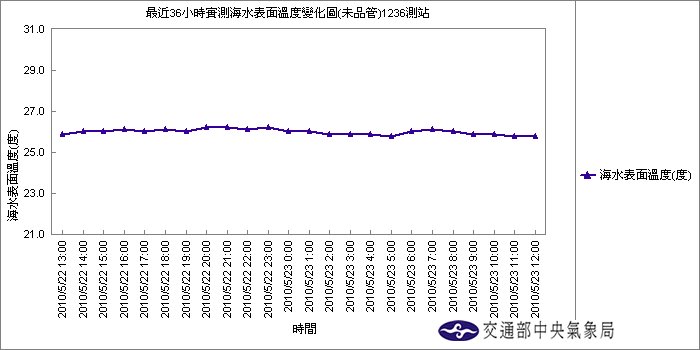
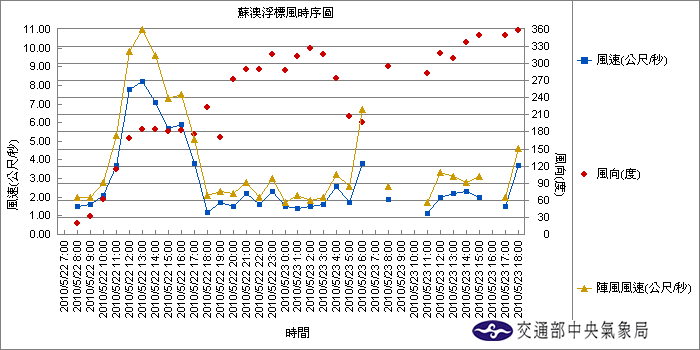
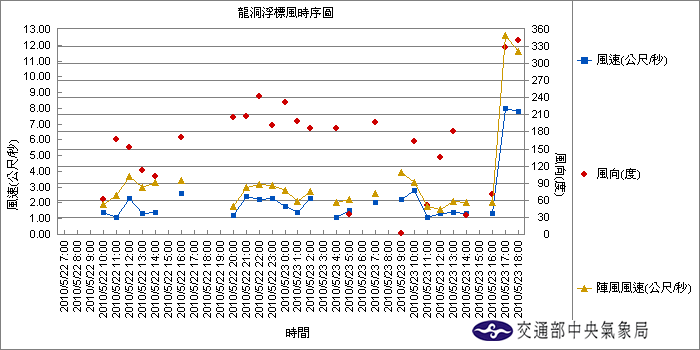
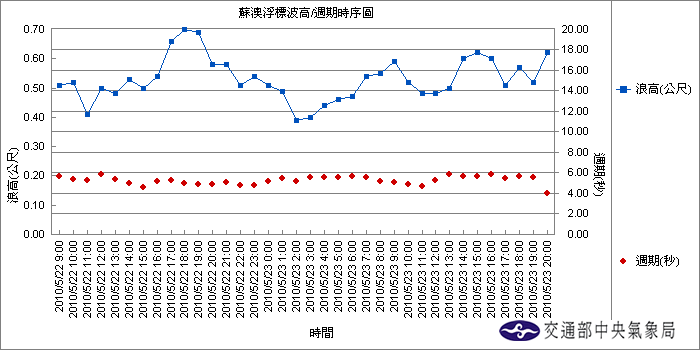
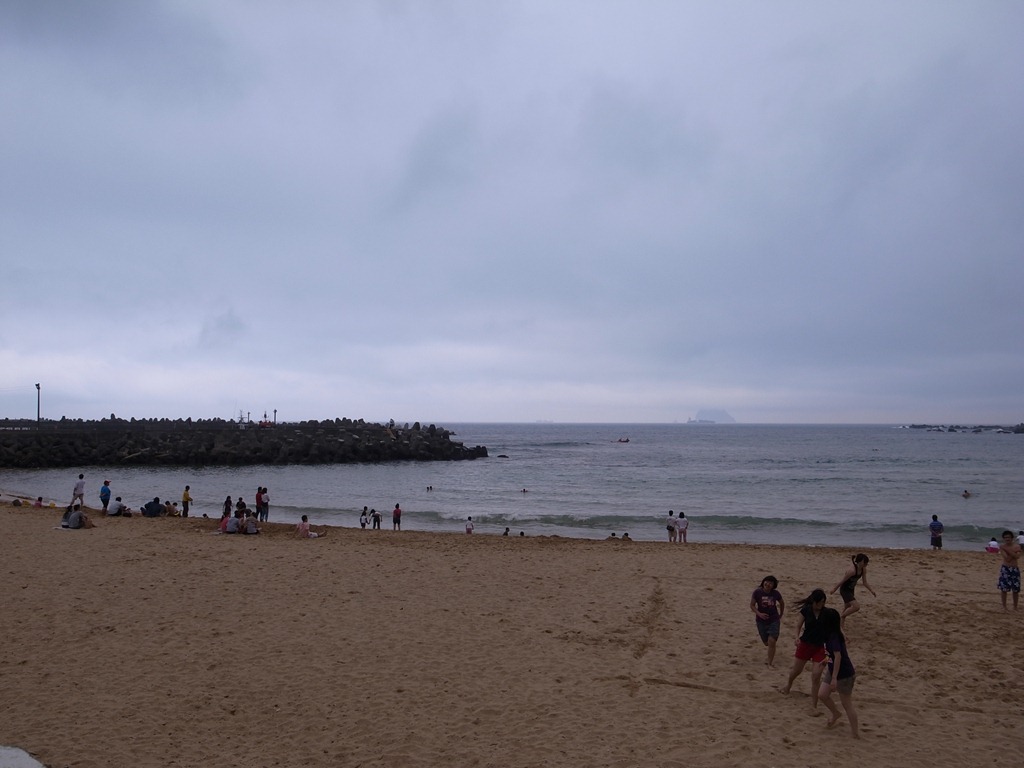
Plan for 5/23 烏石港 swimming / 水溫 / 洋流方向
台灣每年都有兩個季節風期。東北風時期從9月到次年5月,而6月到8月則為西南風時期。台灣海峽除了6~7月為西南季風之外,大多為東北季風型態.
黑潮主流: 黑潮為源自赤道附近的洋流,北流至台灣南端附近分成兩股︰
主流沿台灣東部海岸北上,具高溫、高鹽度等特性,表面水溫平均可達27°C,寬度約為110~150公里,中軸線距岸約50~150公里,最大流速為60~100公分/秒。最強流速出現在接近台灣的海岸處,流速向東逐漸降低,對台灣東部的氣候與漁產有相當大的影響。 黑潮支流沿台灣西岸而上,夏季時因西風吹送,可流經整個台灣海峽;冬季受到東北季風的影響,僅流至澎湖群島附近,與北方南下的中國沿岸流會合後,折向西流入南海。
Monster 好吃燒餅 search
2010.0512 麟光站無名燒餅夾蛋 , 特色是不會太甜(豆漿也是不會太甜), 烤得軟硬剛好.
[上午 10:18:15] RUTEN Hash: 我覺得這燒餅烤的軟硬適中
就算不是剛出爐的咬起來也還是很有嚼勁~
再加上個灑了點鹽巴的蔥蛋吃起來超搭的
咬一口再配一口豆漿簡直就是天生一對
PS:蛋好像不只一顆,豆漿還有渣應該是現磨現煮的的
讚啦
報名?
IRONMAN Taiwan – 10月
http://www.ironmantaiwan.com/
桃園標鐵 – 6/27
http://www.ctta.org.tw/front/bin/ptlist.phtml?Category=265849
2010年基隆市外木山海上4000公尺長泳 – 7/4
日期:中華民國九十九年七月四日(星期日)上午06:00~13:00
自即日起至99年5月25日(星期二)止。一律使用網路線上報名, 網址: http://www.nnjh.kl.edu.tw/
新台幣400元整