sqlrelay
sqlrelay sample code / prepare statement / bind value 寫法
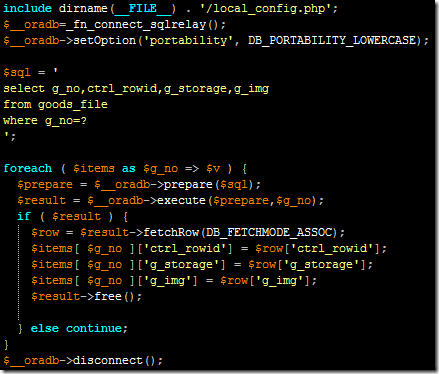
include dirname(__FILE__) . '/local_config.php';
$__oradb=_fn_connect_sqlrelay();
$__oradb->setOption('portability', DB_PORTABILITY_LOWERCASE);

$sql = '
select g_no,ctrl_rowid,g_storage,g_img
from goods_file
where g_no=?
';

foreach ( $items as $g_no => $v ) {
  $prepare = $__oradb->prepare($sql);
  $result = $__oradb->execute($prepare,$g_no);
  if ( $result ) {
    $row = $result->fetchRow(DB_FETCHMODE_ASSOC);
    $items[ $g_no ]['ctrl_rowid'] = $row['ctrl_rowid'];
    $items[ $g_no ]['g_storage'] = $row['g_storage'];
    $items[ $g_no ]['g_img'] = $row['g_img'];
    $result->free();

  } else continue;
}
$__oradb->disconnect();
sqlrelay client for php and C : install / settings / history / tunning 方法
2017-0920 update:
stable version = rudiments-0.32 + sqlrelay-0.39.4
./sqlrelay-0.39.4/src/api/php/.libs/libsql_relay.so.0.0.0
step1. 裝 sqlrelay 前要先裝 Rudiments 的 library , 現在抓 rudiments 0.32 版.
- fetch source : http://downloads.sourceforge.net/rudiments/rudiments-0.32.tar.gz?modtime=1231398532&big_mirror=0
- configure , make , make install
PATH="$PATH:/sbin" ldconfig -n /usr/local/firstworks/lib
Libraries have been installed in:
/usr/local/firstworks/lib
他有提到幾點
– add LIBDIR to the `LD_LIBRARY_PATH’ environment variable
during execution
– add LIBDIR to the `LD_RUN_PATH’ environment variable
during linking
– use the `-Wl,–rpath -Wl,LIBDIR’ linker flag
– have your system administrator add LIBDIR to `/etc/ld.so.conf’
—->解決 lib 問題 : ld.so.conf
step2. 裝 sqlrelay , 抓
- wget http://downloads.sourceforge.net/sqlrelay/sqlrelay-0.40.tar.gz?modtime=1231398430&big_mirror=0
- configure , make , make install
- 檢查是否有 sql_relay.so : find / -name sql_relay.so -print
/usr/lib/php5/lib/php/extensions/no-debug-non-zts-20060613/sql_relay.so - gentoo 在 /etc/php 下的兩個環境 : apache2-php5 , cli-php5 目錄 裡面的 ext , ext-active 都要有這個 file : sqlrelay.ini , 內容是
extension=sql_relay.so - 找安裝程式把 libsqlrclientwrapper*so* 放在哪個目錄 , 再修改 /etc/ld.so.conf 加上這個目錄 , 改完要下 ldconfig –v 讓路徑生效
用 php code 測試 sqlrelay extension 是否 load 進來了
$a = get_loaded_extensions();
print_r( $a );
以下是 SQL Relay server 端的設定—–
Tuning SQL Relay –
http://sqlrelay.sourceforge.net/sqlrelay/tuning.html
這邊提到一些改善 SQL Relay 效能的方法, 不過這些方法也適用於一些 networked daemon 的 tunning
如 下 sysctl -a|grep timeout 看到
net.ipv4.tcp_fin_timeout = 60 設成 30 ,
echo 30 > /proc/sys/net/ipv4/tcp_fin_timeout
tcp_tw_recycle , tcp_tw_reuse 這兩個 default 是 0 (關起來的) 設成 1 ,
echo 1 > /proc/sys/net/ipv4/tcp_tw_reuse
echo 1 > /proc/sys/net/ipv4/tcp_tw_recycle
——–
cat /etc/sysctl.conf
net.ipv4.ip_local_port_range = “1024 65535” —> 這個在 gentoo 好像無效
net.ipv4.tcp_fin_timeout = 30
net.ipv4.tcp_tw_recycle = 1
net.ipv4.tcp_tw_reuse = 1
oracle/sqlrelay/php 把 field 的 name 轉成小寫 sample code
// $__oradb->setOption('portability', DB_PORTABILITY_LOWERCASE);
require_once "config.php";
require_once "sqlrelay.php";


unset($__config['sqlrelay_dsn']);
$__config['sqlrelay_dsn'][]="sqlrelay://xx_id:[email protected]:9000";

$sql="select aaa,bbb from xxxx t where g_close_date is null";

$__now=get_microtime();
$__oradb=_fn_connect_sqlrelay();
$__oradb->setOption('portability', DB_PORTABILITY_LOWERCASE);

$result = $__oradb->query($sql);
if (DB::isError($result)) {
  echo "db error\n";
  printf("Execution time : %s\n",get_microtime()-$__now);
  exit;
}

while ( $row=$result->fetchRow(DB_FETCHMODE_ASSOC) ) {
  // -----
  echo $row['aaa'] . ' : ' . $row['bbb'];
}

$result->free();
$__oradb->disconnect();


// 取時間 function
function get_microtime() {
    list($usec, $sec) = explode(' ',microtime() );
    return ((double)$usec + (double)$sec);
}