server 端:
rimmon@chicago:~$ pwd
/home/rimmon
rimmon@chicago:~$ svnadmin create SVN
改 SVN/conf/svnserve.conf
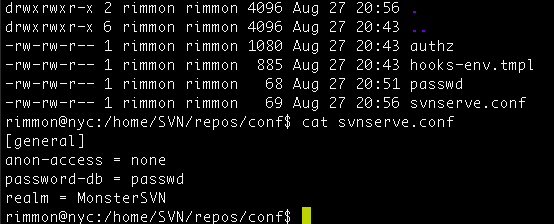
[general]
anon-access = none
password-db = passwd
realm = Chicago_SVN
—
client 端:
在 ~/.subversion/config
加上
### Section for configuring tunnel agents.
[tunnels]
mmm = ssh -p 2200 -q
—
checkout :
svn co svn+mmm://chicago.monster.tw/home/rimmon/SVN .
cat .subversion/config
[tunnels]
foo = ssh -p 2200
### Configure svn protocol tunnel schemes here. By default, only
### the ‘ssh’ scheme is defined. You can define other schemes to
### be used with ‘svn+scheme://hostname/path’ URLs. A scheme
### definition is simply a command, optionally prefixed by an
### environment variable name which can override the command if it
### is defined. The command (or environment variable) may contain
### arguments, using standard shell quoting for arguments with
### spaces. The command will be invoked as:
### <command> <hostname> svnserve -t
### (If the URL includes a username, then the hostname will be
### passed to the tunnel agent as <user>@<hostname>.) If the
### built-in ssh scheme were not predefined, it could be defined
### as:
# ssh = $SVN_SSH ssh -q
### If you wanted to define a new ‘rsh’ scheme, to be used with
### ‘svn+rsh:’ URLs, you could do so as follows:
# rsh = rsh
### Or, if you wanted to specify a full path and arguments:
# rsh = /path/to/rsh -l myusername
### On Windows, if you are specifying a full path to a command,
### use a forward slash (/) or a paired backslash (\\) as the
### path separator. A single backslash will be treated as an
### escape for the following character.
svn co svn+foo://nyc.monster.tw/home/SVN/repos .