Posts tagged ‘dba’

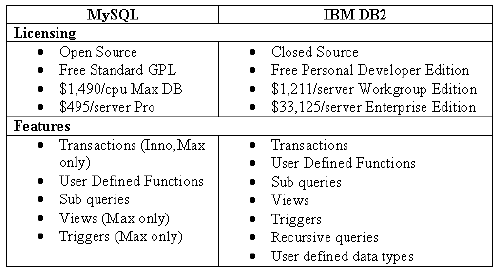
Oracle 貴到不像話! 開始 IBM DB2 解決方案 / mysql to db2 轉移

http://articles.sitepoint.com/article/php-database-db2

DB2table

http://www.ibm.com/developerworks/data/library/techarticle/scott/0614_scott.html

Application Development with DB2

http://www-01.ibm.com/software/data/db2/ad/

http://www.ibm.com/developerworks/cn/data/library/techarticles/dm-0610tham/


利用 MySQL 技能学习 DB2 Express: DB2 与 MySQL 的管理任务和基本任务
您的数据库环境要求具有跨数据库的技能吗?如果您熟悉 MySQL,那么可以使用您已经拥有的很多技能来学习 DB2 Express。本文是关于利用 MySQL 技能学习 DB2 的系列文章的第一部分,将对管理任务、数据类型、SQL、锁定等进行比较。
2006年4月3日

利用 MySQL 技能学习 DB2 Express: DB2 与 MySQL 的备份和恢复
具有 MySQL 背景的 DBA 可以利用本指南学习 DB2 中的备份和恢复实用程序是如何工作的,并与 MySQL 中的备份和恢复功能进行对比。
2006年7月18日

从 MySQL 或 PostgreSQL 迁移到 DB2 Express-C
容易使用、强大而且免费!这就是人们对 MySQL 和 PostgreSQL 的评价。但是,您知道 DB2 Express-C 是一种免费的具有专业水准且容易使用的数据库吗?学习如何轻松地从 MySQL/PostgreSQL 迁移到 DB2
2006年9月11日

利用 MySQL 技能学习 DB2 Express,第 4 部分: DB2 与 MySQL 数据转移
如果您是一位要同时管理 MySQL 和 IBM DB2 Express-C 的 DBA,就需要理解这两种数据库服务器的功能差异。本文是系列文章中的第 4 篇,这个系列帮助具有 MySQL 背景的 DBA 学习如何管理 DB2 Express。在本文中,学习在这两种产品中数据转移技术有何差异。讨论的技术包括 Import、Export、Load 以及专门用于数据转移的其他实用程序。
2007年2月1日

利用 MySQL 技能学习 DB2 Express,第 3 部分: DB2 与 MySQL 图形用户界面
DB2 for Linux, UNIX, and Windows 提供了丰富的 GUI 特性,使管理员能够执行他们的日常任务,包括空间管理、备份和恢复以及与开发相关的任务。本文帮助正在从 MySQL 迁移到 DB2 Express 的读者对比这两种数据库的功能。

install oracle 11g steps

記錄一下, 方便查詢

ORACLE URL : Installing Oracle Database 11g Release 1 on Enterprise Linux 5 (32- and 64-bit)
- http://www.oracle.com/technology/pub/articles/smiley-11gr1-install.html?rssid=rss_otn_articles

ORACLE wiki : http://wiki.oracle.com/

step-by-step screenshots : http://www.thegeekstuff.com/2008/10/oracle-11g-step-by-step-installation-guide-with-screenshots/

Install Oracle 11g on CentOS with VMware ( Mac )
- http://wiki.oracle.com/page/Installing+Oracle+11g+on+CentOS+under+VMWare+on+a+Macbook

Oracle 11g R1 Enterprise安裝研究(CentOS 5.2) : http://forum.icst.org.tw/phpbb/viewtopic.php?f=21&t=16411&start=0&sid=866700eee479d130d126967c3160e7f4

Oracle 11g R2 Enterprise (CentOS 5.3 x86_64) 安裝筆記 : http://hans0713.blogspot.com/2009/10/oracle-11g-r2-enterprise-centos-53.html

Oracle 9i Streams 安裝步驟 – http://www.oracle-base.com/articles/9i/Streams9i.php

Oracle 11g Release 2 RAC On Linux Using VMware Server 2 -
http://www.oracle-base.com/articles/11g/OracleDB11gR2RACInstallationOnOEL5UsingVMwareServer2.php

筆記一下網上看到的:

Linux OS 下這些調整 sysctl

fs.file-max = 65535
kernel.shmall = 2097152
kernel.shmmax = 2147483648
kernel.shmmni = 4096
kernel.sem = 250 32000 100 128
net.ipv4.ip_local_port_range = 1024 65535
net.core.rmem_default = 4194304
net.core.rmem_max = 4194304
net.core.wmem_default = 262144
net.core.wmem_max = 262144

http://forum.icst.org.tw/phpbb/viewtopic.php?f=21&t=16411&start=0&sid=866700eee479d130d126967c3160e7f4

Protected: Difference between logical & physical standby database?

This post is password protected. To view it please enter your password below:


Protected: 2009.0914 經典名言

This post is password protected. To view it please enter your password below:


Protected: oracle standby loading burst

This post is password protected. To view it please enter your password below:


Database administrator

A database administrator (DBA) is a person who is responsible for the environmental aspects of a database. The role of a database administrator has changed according to the technology of database management systems (DBMSs) as well as the needs of the owners of the databases. For example, although logical and physical database design are traditionally the duties of a database analyst or database designer, a DBA may be tasked to perform those duties.

Duties

The duties of a database administrator vary and depend on the job description, corporate and Information Technology (IT) policies and the technical features and capabilities of the DBMS being administered. They nearly always include disaster recovery (backups and testing of backups), performance analysis and tuning, data dictionary maintenance, and some database design.

Some of the roles of the DBA may include

  • Installation of new software — It is primarily the job of the DBA to install new versions of DBMS software, application software, and other software related to DBMS administration. It is important that the DBA or other IS staff members test this new software before it is moved into a production environment.
  • Configuration of hardware and software with the system administrator — In many cases the system software can only be accessed by the system administrator. In this case, the DBA must work closely with the system administrator to perform software installations, and to configure hardware and software so that it functions optimally with the DBMS.
  • Security administration — One of the main duties of the DBA is to monitor and administer DBMS security. This involves adding and removing users, administering quotas, auditing, and checking for security problems.
  • Data analysis — The DBA will frequently be called on to analyze the data stored in the database and to make recommendations relating to performance and efficiency of that data storage. This might relate to the more effective use of indexes, enabling "Parallel Query" execution, or other DBMS specific features.
  • Database design (preliminary) — The DBA is often involved at the preliminary database-design stages. Through the involvement of the DBA, many problems that might occur can be eliminated. The DBA knows the DBMS and system, can point out potential problems, and can help the development team with special performance considerations.
  • Data modeling and optimization — By modeling the data, it is possible to optimize the system layouts to take the most advantage of the I/O subsystem.
  • Responsible for the administration of existing enterprise databases and the analysis, design, and creation of new databases.
    • Data modeling, database optimization, understanding and implementation of schemas, and the ability to interpret and write complex Structured Query Language (SQL) queries
    • Proactively monitor systems for optimum performance and capacity constraints
    • Establish standards and best practices for SQL
    • Interact with and coach developers in SQL scripting


http://metalink.oracle.com/
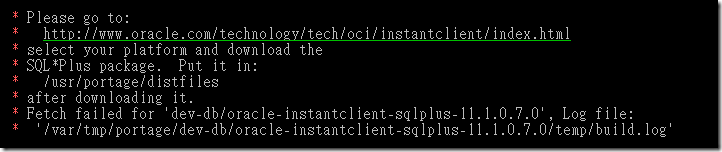
在 gentoo 裝 oracle sqlplus package

5a7d294f8002b7cbcefa422e9598e2cf

去 Oracle 那邊 download
05a6575d78ea1ec511646bd57e002b71

那個 instantclient-sqlplus-linux32-11.1.0.7.zip
放到 /usr/portage/distfiles

下 emerge -av dev-db/oracle-instantclient-sqlplus

Protected: Question about Oracle schema

This post is password protected. To view it please enter your password below:


Protected: ★★★ Oracle streams standby architecture 架構圖 – 很多值得參考的範例

This post is password protected. To view it please enter your password below:


Manage Oracle Streams Advanced Queuing – DBMS_AQADM


官網資料 : http://download-west.oracle.com/docs/cd/B19306_01/appdev.102/b14258/d_aqadm.htm#i1015375

The DBMS_AQADM package provides procedures to manage Oracle Streams Advanced Queuing (AQ) configuration and administration information.

See Also:

This chapter contains the following topics:

Oracle Applications DBA Field Guide

看看它的各章節, 也許可以知道 DBA 的工作是什麼

http://www.amazon.com/Oracle-Applications-Field-Guide-Experts/dp/1590596447/ref=sr_1_1?ie=UTF8&s=books&qid=1244462254&sr=1-1

Ch1. Components and Architecture of Oracle Applications
Ch2. Configuration
Ch3. Monitoring and Troubleshooting
Ch4. Performance Tuning
Ch5. Patching
Ch6. Toolkit
Ch7. Resources

另外, 這邊有一位真正的 Oracle DBA : http://blog.xuite.net/charley_ocp/mydba01

Protected: 最近遇上的 Oracle 問題, 2009.0608 心得

This post is password protected. To view it please enter your password below:


Protected: Oracle’s V$ Views

This post is password protected. To view it please enter your password below:


Protected: Oracle , full-table-scans ( FTS ) 迷思? — 想看的跟我要密碼

This post is password protected. To view it please enter your password below:


Oracle hint 用法 , database 優化 tunning

常見Oracle HINT的用法:

1. /*+ALL_ROWS*/
表明對語句塊選擇基於開銷的優化方法,並獲得最佳吞吐量,使資源消耗最小化.
例如:
SELECT /*+ALL+_ROWS*/ EMP_NO,EMP_NAM,DAT_IN FROM BSEMPMS WHERE EMP_NO=’SCOTT’;
2. /*+FIRST_ROWS*/
表明對語句塊選擇基於開銷的優化方法,並獲得最佳響應時間,使資源消耗最小化.
例如:
SELECT /*+FIRST_ROWS*/ EMP_NO,EMP_NAM,DAT_IN FROM BSEMPMS WHERE EMP_NO=’SCOTT’;

3. /*+CHOOSE*/
表明如果數據字典中有訪問表的統計資料,將基於開銷的優化方法,並獲得最佳的吞吐量;
表明如果數據字典中沒有訪問表的統計資料,將基於規則開銷的優化方法;
例如:
SELECT /*+CHOOSE*/ EMP_NO,EMP_NAM,DAT_IN FROM BSEMPMS WHERE EMP_NO=’SCOTT’;

4. /*+RULE*/
表明對語句塊選擇基於規則的優化方法.
例如:
SELECT /*+ RULE */ EMP_NO,EMP_NAM,DAT_IN FROM BSEMPMS WHERE EMP_NO=’SCOTT’;

5. /*+FULL(TABLE)*/
表明對表選擇全局掃描的方法.
例如:
SELECT /*+FULL(A)*/ EMP_NO,EMP_NAM FROM BSEMPMS A WHERE EMP_NO=’SCOTT’;

6. /*+ROWID(TABLE)*/
提示明確表明對指定表根據ROWID進行訪問.
例如:
SELECT /*+ROWID(BSEMPMS)*/ * FROM BSEMPMS WHERE ROWID>=’AAAAAAAAAAAAAA’
AND EMP_NO=’SCOTT’;

7. /*+CLUSTER(TABLE)*/
提示明確表明對指定表選擇簇掃描的訪問方法,它只對簇對像有效.
例如:
SELECT /*+CLUSTER */ BSEMPMS.EMP_NO,DPT_NO FROM BSEMPMS,BSDPTMS
WHERE DPT_NO=’TEC304′ AND BSEMPMS.DPT_NO=BSDPTMS.DPT_NO;

8. /*+INDEX(TABLE INDEX_NAME)*/
表明對錶選擇索引的掃描方法.
例如:
SELECT /*+INDEX(BSEMPMS SEX_INDEX) USE SEX_INDEX BECAUSE THERE ARE FEWMALE BSEMPMS */ FROM BSEMPMS WHERE SEX=’M';

9. /*+INDEX_ASC(TABLE INDEX_NAME)*/
表明對錶選擇索引升序的掃描方法.
例如:
SELECT /*+INDEX_ASC(BSEMPMS PK_BSEMPMS) */ FROM BSEMPMS WHERE DPT_NO=’SCOTT’;

10. /*+INDEX_COMBINE*/
為指定表選擇位圖訪問路經,如果INDEX_COMBINE中沒有提供作為參數的索引,將選擇出位圖索引的布爾組合方式.
例如:
SELECT /*+INDEX_COMBINE(BSEMPMS SAL_BMI HIREDATE_BMI)*/ * FROM BSEMPMS
WHERE SAL<5000000 emp_no="SCOTT" sex="M" dpt_no="V.DPT_NO">V.AVG_SAL;

20. /*+NO_MERGE(TABLE)*/
對於有可合併的視圖不再合併.
例如:
SELECT /*+NO_MERGE(V) */ A.EMP_NO,A.EMP_NAM,B.DPT_NO FROM BSEMPMS A (SELECT DPT_NO,AVG(SAL) AS AVG_SAL FROM BSEMPMS B GROUP BY DPT_NO) V WHERE A.DPT_NO=V.DPT_NO AND A.SAL>V.AVG_SAL;

21. /*+ORDERED*/
根據表出現在FROM中的順序,ORDERED使ORACLE依此順序對其連接.
例如:
SELECT /*+ORDERED*/ A.COL1,B.COL2,C.COL3 FROM TABLE1 A,TABLE2 B,TABLE3 C WHERE A.COL1=B.COL1 AND B.COL1=C.COL1;

22. /*+USE_NL(TABLE)*/
將指定表與嵌套的連接的行源進行連接,並把指定表作為內部表.
例如:
SELECT /*+ORDERED USE_NL(BSEMPMS)*/ BSDPTMS.DPT_NO,BSEMPMS.EMP_NO,BSEMPMS.EMP_NAM FROM BSEMPMS,BSDPTMS WHERE BSEMPMS.DPT_NO=BSDPTMS.DPT_NO;

23. /*+USE_MERGE(TABLE)*/
將指定的表與其他行源通過合併排序連接方式連接起來.
例如:
SELECT /*+USE_MERGE(BSEMPMS,BSDPTMS)*/ * FROM BSEMPMS,BSDPTMS WHERE BSEMPMS.DPT_NO=BSDPTMS.DPT_NO;

24. /*+USE_HASH(TABLE)*/
將指定的表與其他行源通過hash連接方式連接起來.
例如:
SELECT /*+USE_HASH(BSEMPMS,BSDPTMS)*/ * FROM BSEMPMS,BSDPTMS WHERE BSEMPMS.DPT_NO=BSDPTMS.DPT_NO;

25. /*+DRIVING_SITE(TABLE)*/
強制與ORACLE所選擇的位置不同的表進行查詢執行.
例如:
SELECT /*+DRIVING_SITE(DEPT)*/ * FROM BSEMPMS,DEPT@BSDPTMS WHERE BSEMPMS.DPT_NO=DEPT.DPT_NO;

26. /*+LEADING(TABLE)*/
將指定的表作為連接次序中的首表.

27. /*+CACHE(TABLE)*/
當進行 full scan 時,CACHE提示能夠將表的檢索塊放置在緩衝區緩存中最近最少列表LRU的最近使用端
例如:
SELECT /*+FULL(BSEMPMS) CAHE(BSEMPMS) */ EMP_NAM FROM BSEMPMS;

28. /*+NOCACHE(TABLE)*/
當進行 full scan 時,CACHE提示能夠將表的檢索塊放置在緩衝區緩存中最近最少列表LRU的最近使用端
例如:
SELECT /*+FULL(BSEMPMS) NOCAHE(BSEMPMS) */ EMP_NAM FROM BSEMPMS;

29. /*+APPEND*/
直接插入到表的最後,可以提高速度.
insert /*+append*/ into test1 select * from test4 ;

30. /*+NOAPPEND*/
通過在插入語句生存期內停止並行模式來啟動常規插入.
insert /*+noappend*/ into test1 select * from test4 ;

筆記 oracle sqlplus 連線 不用 tnsname 檔案的方法 / syntax

sqlplus account/password@172.25.0.18x/service_name

sqlplus sys/password@172.30.0.48/oradb as sysdba

sqlplus /nolog

conn account/password@172.25.0.18x/service_name

Protected: 一箱 oracle 的問與答 / tunning / password 公司統編

This post is password protected. To view it please enter your password below: