Software
Apache 是 Internet 世界最偉大的 project
以前 打 www.apache.org 可能就是看到 apache web server 的 download , document ….等等, 但隨著越來越多開發者把他們的 project 標記成 apache license , apache 於是變成一個巨大的 project 集中地 – The Apache Software Foundation ….
apache web server 是排名第一的 web server 這不用說, 今天認識了 Lucene , Solr 這個應該算是 apache 第二大
Apache Lucene Java 分類是 database
http://projects.apache.org/projects/lucene_java.html
Apache Solr 是被分類在 web-framework, network-server
http://projects.apache.org/projects/solr.html
很強的 Message Broker : ActiveMQ
Supports a variety of Cross Language Clients and Protocols from Java, C, C++, C#, Ruby, Perl, Python, PHP
Features : http://activemq.apache.org/features-overview.html
Use subversion on Dropbox steps
這麼一來, 可以用 Dropbox 的地方就可以輕鬆的 check out code 了
svn checkout command
svn co file:///Users/rimmon/Dropbox/SVN
kvm / qemu simple command
建立一個新的 image : qemu-img create winxp.raw 8GB
啟動一個 guest os 用 VNC 連接 : kvm –hda winxp.raw –cdrom /dev/cdrom –vnc :2
[下午 02:21:04] _RTN gillight: 如果有 適合的 CPU 的話
[下午 02:21:11] _RTN gillight: KVM 會有些優勢
[下午 02:21:26] _RTN gillight: 1. 近似 native 的 CPU 利用
[下午 02:22:03] _RTN gillight: 2. 近似 native 的網路利用 (KVM的半虛擬化驅動程式)
[下午 02:22:23] _RTN gillight: 3. 近似 native 的硬碟利用 (也是KVM的半虛擬化驅動程式)
[下午 02:22:50] _RTN gillight: 4. 動態縮放guest主機的實體記憶體大小
[下午 02:23:56] _RTN gillight: 然後剛剛說的那個 library 叫做 libvirt
[下午 02:26:05] _RTN gillight: 剛剛應該可以參考這個網頁
[下午 02:26:06] _RTN gillight: https://help.ubuntu.com/10.04/serverguide/C/libvirt.html
[下午 02:26:58] _RTN gillight: virt-viewer 是官方推薦的 GUI
[下午 02:27:02] _RTN gillight: 但我沒用過
[下午 02:27:42] _RTN gillight: 我還是覺得要管一堆虛擬機器的話 webUI 還是最方便的
[下午 02:27:51] Rimmon 2.0: (y)
[下午 02:27:59] Rimmon 2.0: 有喵到
[下午 02:28:51] _RTN gillight: 我自己現在適用 VirtualBox
[下午 02:28:57] _RTN gillight: 本來是昇陽的產品
[下午 02:29:11] _RTN gillight: 現在變成萬惡甲骨文的了
[下午 02:37:52] Rimmon 2.0: 對呀, 一開 virtualbox 就看到 oracle ….
[下午 02:38:20] _RTN gillight: 更囧的事
[下午 02:38:29] _RTN gillight: 開 java 也會看到 oracle
[下午 02:38:38] Rimmon 2.0: 有點嚇一跳
[下午 02:39:03] Rimmon 2.0: 不是, 還有更囧的事
開 mysql 也會看到 oracle Orz
[下午 02:39:05] _RTN gillight: 還導致 Eclipse 死當
[下午 02:39:53] _RTN gillight: http://bugs.sun.com/bugdatabase/view_bug.do?bug_id=6969236
[下午 02:40:44] _RTN gillight: 因為急著改名導致程式死當的案例…..
[下午 02:40:56] Rimmon 2.0: 這就是 hardcode 的結果呀
[下午 02:41:22] _RTN gillight: 😛 的確是
把 wordpress blog 立即變成 mobile friendly 的套件
阿毛介紹的: http://mobilepress.co.za/
裝好後它會偵測 user 的 user agent 若是 mobile 就會把頁面換成 ‘手機’ 版.
我的第一隻 iPhone 程式 – HelloMap !
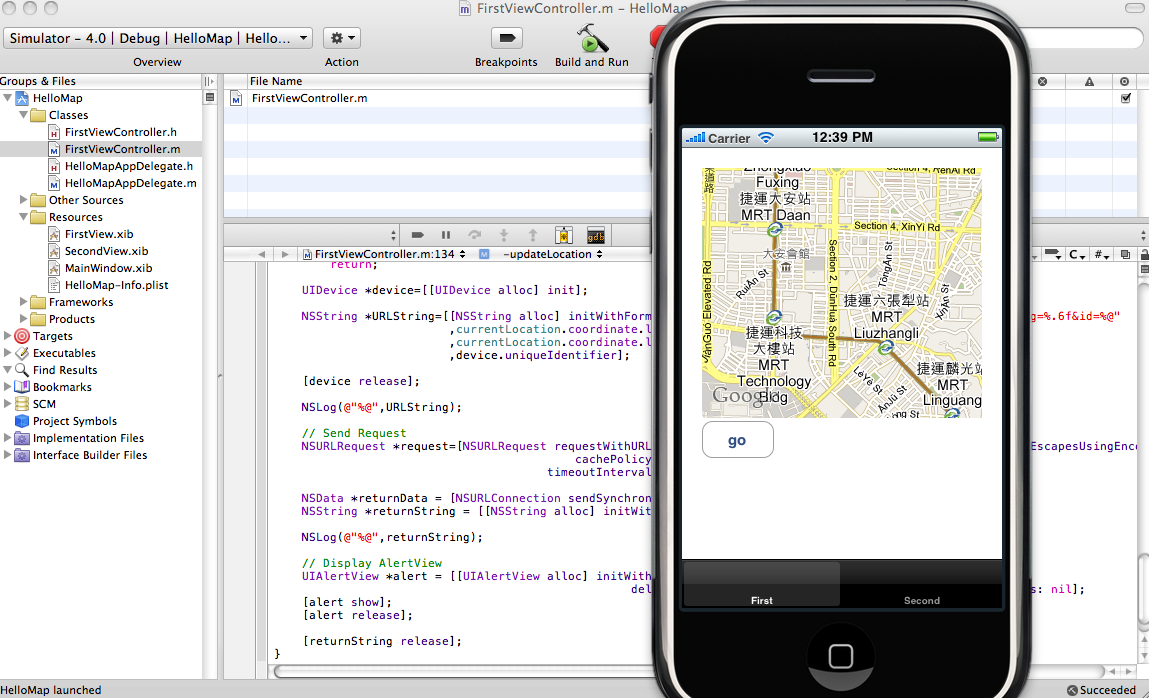
這隻程式會展現一個地圖, 並以目前定位的座標為中心點, 及一個按鈕,按下按鈕會把座標及UDID傳送到 server , 由 server 端的程式記錄下來, 並且 server 端亂數送出一個水果名回傳給 iPhone client 端, iPhone client 端再把這水果名 show 在 iPhone screen上.
底下是片斷程式碼:
FirstViewController.h :
#import
#import
#import

@interface FirstViewController : UIViewController  {
  IBOutlet MKMapView *mapView;
  CLLocationManager *locationManager;
  CLLocation *currentLocation;

}

- (IBAction) updateLocation;

@end
FirstViewController.m :
- (void)viewDidLoad {
  [super viewDidLoad];

  if (locationManager==nil) {
    locationManager = [[CLLocationManager alloc] init];
    locationManager.delegate = self;
  }

  [locationManager startUpdatingLocation];

  [mapView setMapType:MKMapTypeStandard];
}

- (void)locationManager:(CLLocationManager *)manager
  didUpdateToLocation:(CLLocation *)newLocation
       fromLocation:(CLLocation *)oldLocation {

  NSLog(@"Location : %.6f , %.6f", newLocation.coordinate.latitude , newLocation.coordinate.longitude );

  MKCoordinateRegion region = [mapView region];

  region.center = newLocation.coordinate;

  MKCoordinateSpan span;
  span.latitudeDelta = 0.01;
  span.longitudeDelta = 0.01;
  region.span = span;
  [mapView setRegion:region animated:TRUE];

  //
  if ( currentLocation != nil) {
    [currentLocation release];
    currentLocation = nil;
  }
  currentLocation = [newLocation copy];

}
- (IBAction) updateLocation {

  if(currentLocation==nil)
    return;

  UIDevice *device=[[UIDevice alloc] init];

  NSString *URLString=[[NSString alloc] initWithFormat:@"http://z.monster.tw/save_location.php?lat=%.6f&lng=%.6f&id=%@"
             ,currentLocation.coordinate.latitude
             ,currentLocation.coordinate.longitude
             ,device.uniqueIdentifier];

  [device release];

  NSLog(@"%@",URLString);

  // Send Request
  NSURLRequest *request=[NSURLRequest requestWithURL:[NSURL URLWithString:[URLString stringByAddingPercentEscapesUsingEncoding:NSUTF8StringEncoding]]
                       cachePolicy:NSURLRequestReloadIgnoringCacheData
                     timeoutInterval:20.0];

  NSData *returnData = [NSURLConnection sendSynchronousRequest:request returningResponse:nil error:nil];
  NSString *returnString = [[NSString alloc] initWithData:returnData encoding:NSUTF8StringEncoding];

  NSLog(@"%@",returnString);

  // Display AlertView
  UIAlertView *alert = [[UIAlertView alloc] initWithTitle:returnString message:@"Thanks!"
                           delegate:self cancelButtonTitle:@"Close" otherButtonTitles: nil];
  [alert show];
  [alert release];

  [returnString release];
}