Garmin 310XT PK iPhone4 GPS location 精準度
這個是 5/12 跑運動場跑道外圈 15圈的結果, PK結論是 Garmin 310 XT 贏 iPhone 4 在 GPS location 精準度部分 (果然還是得讓專業的來 XD)
Continue reading ‘Garmin 310XT PK iPhone4 GPS location 精準度’ »
Sky / Ocean / Tree
Posts tagged ‘iphone’
這個是 5/12 跑運動場跑道外圈 15圈的結果, PK結論是 Garmin 310 XT 贏 iPhone 4 在 GPS location 精準度部分 (果然還是得讓專業的來 XD)
Continue reading ‘Garmin 310XT PK iPhone4 GPS location 精準度’ »
有時候想寫一個從相簿挑選照片的程式, 但 xcode 的 simulator 並不支援照相功能 ,
那個 simulator 相簿總是空空的 , 無法從那邊挑選照片, 於是寫了這個小程式 ,
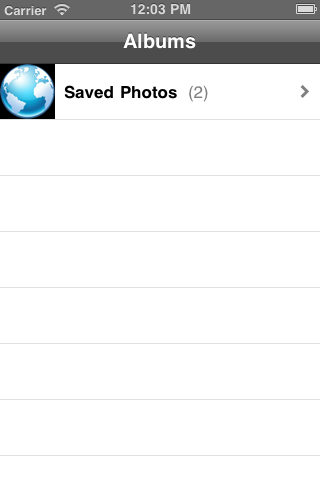
program 功能是從一個 圖片網址 把那張圖抓下來並且存進 simulator 的相簿中, 這個 code 有實作存成功跟存失敗時的 method.
今天並且練習把這個 open source code hosting 在 google code , 可以 download 下來參考.
URL = https://code.google.com/p/monster-oasis-opensource-iphone/downloads/list
google code 也提供 svn checkout 機制 , 怎麼 check out
參考 URL = https://code.google.com/p/monster-oasis-opensource-iphone/source/checkout
不過發現 google code 雖然提供熟悉的 svn 機制 , 但是有兩大缺點:
不如, 來看一下 git 怎麼用: https://github.com/plans
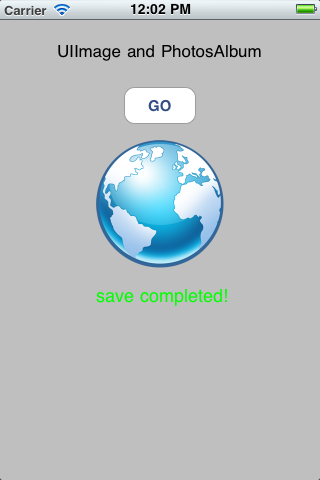
以下是 這個 code 的截圖:

2010.1206 10:30 , 地點: 板橋海山體育場 , SCORE:89%
ADIDAS micoach website : http://www.adidas.com/com/micoach/
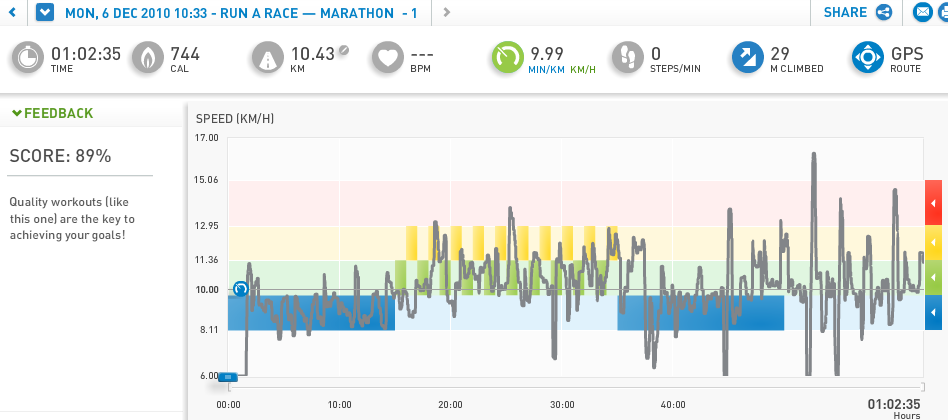
Continue reading ‘試用 ADIDAS 的 micoach iPhone APP. 跑10K間歇 ( without heart rate monitor)’ »
首先, 可以這樣定義 , 定義出有 3 個 section , 在那個 enum Sections array 中, 第一個 item 就讓它的 value = 0 , 那麼最後一個item : NUM_SECTIONS 的 value自然就是這個 array 的 item 數, 就這樣精簡漂亮!!讚嘆! code 寫這樣就非常清楚易懂, 也好 maintain.
再依此定義出 每個 section 的 rows …..

—-
在 numberOfRowsInSection 中, 直接來個 switch(section) 用 case name 的方式 ,直接 return 該 section 有多少 rows 數值回去…, 若無法 mapping 到的 section 就是用 default return 0;

—
在 cellForRowAtIndexPath 中 , 要 show 出該 section 的 該 row 內容, 也是用 switch case mapping 的方式 , 把正確的內容回傳…

—
點選 row 時的處理, 也是同樣的作法…

—
http://open.iphonedev.com/
http://www.appsamuck.com/
http://maniacdev.com/open-source-iphone-app-store-apps
http://ntt.cc/2010/08/29/10-best-iphone-application-development-resources-or-tools-you-should-know.html
http://ntt.cc/2010/07/30/11-free-iphone-4-gui-psd-templates-for-designers.html

[上午 10:17:04] _RTN 神奇傑克: object-c的html parser 這裡有解答 http://stackoverflow.com/questions/405749/parsing-html-on-the-iphone
libxml2.2 comes in the SDK, and libxml/HTMLparser.h claims the following:
This module implements an HTML 4.0 non-verifying parser with API compatible with the XML parser ones. It should be able to parse "real world" HTML, even if severely broken from a specification point of view.
class : 大寫開頭
method / instance : 小寫
Property List / SQLite 寫法 sample
類似 printf 的寫法
NSString *debugMsg = [NSString stringWithFormat:@"Process %d", 1];
取亂數
定義:
#define RANDOM_SEED() srandom(time(NULL))
#define RANDOM_INT(__MIN__, __MAX__) ((__MIN__) + random() % ((__MAX__+1) - (__MIN__)))
// --- 這樣用
NSLog(@"%d" , RANDOM_INT(0,9) );
取 unixtime :
NSDate *past = [NSDate date];
NSTimeInterval oldTime = [past timeIntervalSinceDate:[NSDate dateWithNaturalLanguageString:@"01/01/1970"]];
NSString *unixTime = [[NSString alloc] initWithFormat:@"%0.0f", oldTime];
NSLog(@"%@" , unixTime);
印出 debug message / popup alert 的寫法:
// ---
-(void) printdebug:(id)msg {
NSLog(@"%@", msg);
}
// ---
-(void) displayAlertMessage:(id)msg {
// Display AlertView
UIAlertView *alert = [[UIAlertView alloc] initWithTitle:@"___Alert___" message:msg
delegate:self cancelButtonTitle:@"Close" otherButtonTitles: nil];
[alert show];
[alert release];
}
Objective-C 奇怪的 null detect!
if ( (NSNull *)[item objectForKey:@"nick"]==[NSNull null] ) {
// FOR GUEST DATA
cell.textLabel.text = @"Guest";
} else {
// FOR MEMBER DATA
cell.textLabel.text = [item objectForKey:@"nick"];
}
ASYNC network 寫法:
http://mobile.tutsplus.com/tutorials/iphone/iphone-json-twitter-api/
—-
想抓別人的 iphone project 來試玩看看, 在 build 時會有這種 message 的解決方法
Check dependencies
error: There is no SDK with the name or path ‘iphoneos2.2′
重選 “Base SDK for All Configurations” , 如圖:

![]() |
iPhone.and.iPad.Apps.for.Absolute.Beginners(Apress.2010-05) |
這隻程式會展現一個地圖, 並以目前定位的座標為中心點, 及一個按鈕,按下按鈕會把座標及UDID傳送到 server , 由 server 端的程式記錄下來, 並且 server 端亂數送出一個水果名回傳給 iPhone client 端, iPhone client 端再把這水果名 show 在 iPhone screen上.
底下是片斷程式碼:
FirstViewController.h :
#import#import #import @interface FirstViewController : UIViewController { IBOutlet MKMapView *mapView; CLLocationManager *locationManager; CLLocation *currentLocation; } - (IBAction) updateLocation; @end
FirstViewController.m :
- (void)viewDidLoad {
[super viewDidLoad];
if (locationManager==nil) {
locationManager = [[CLLocationManager alloc] init];
locationManager.delegate = self;
}
[locationManager startUpdatingLocation];
[mapView setMapType:MKMapTypeStandard];
}
- (void)locationManager:(CLLocationManager *)manager
didUpdateToLocation:(CLLocation *)newLocation
fromLocation:(CLLocation *)oldLocation {
NSLog(@"Location : %.6f , %.6f", newLocation.coordinate.latitude , newLocation.coordinate.longitude );
MKCoordinateRegion region = [mapView region];
region.center = newLocation.coordinate;
MKCoordinateSpan span;
span.latitudeDelta = 0.01;
span.longitudeDelta = 0.01;
region.span = span;
[mapView setRegion:region animated:TRUE];
//
if ( currentLocation != nil) {
[currentLocation release];
currentLocation = nil;
}
currentLocation = [newLocation copy];
}
- (IBAction) updateLocation {
if(currentLocation==nil)
return;
UIDevice *device=[[UIDevice alloc] init];
NSString *URLString=[[NSString alloc] initWithFormat:@"http://z.monster.tw/save_location.php?lat=%.6f&lng=%.6f&id=%@"
,currentLocation.coordinate.latitude
,currentLocation.coordinate.longitude
,device.uniqueIdentifier];
[device release];
NSLog(@"%@",URLString);
// Send Request
NSURLRequest *request=[NSURLRequest requestWithURL:[NSURL URLWithString:[URLString stringByAddingPercentEscapesUsingEncoding:NSUTF8StringEncoding]]
cachePolicy:NSURLRequestReloadIgnoringCacheData
timeoutInterval:20.0];
NSData *returnData = [NSURLConnection sendSynchronousRequest:request returningResponse:nil error:nil];
NSString *returnString = [[NSString alloc] initWithData:returnData encoding:NSUTF8StringEncoding];
NSLog(@"%@",returnString);
// Display AlertView
UIAlertView *alert = [[UIAlertView alloc] initWithTitle:returnString message:@"Thanks!"
delegate:self cancelButtonTitle:@"Close" otherButtonTitles: nil];
[alert show];
[alert release];
[returnString release];
}
這邊有一些 objective-c 的基本認識 , 參考 URL : http://www.otierney.net/objective-c.html.zh-tw.big5
Continue reading ‘Programming in Objective-C , sample code’ »
★ Your First iOS Application
http://developer.apple.com/iphone/library/documentation/iPhone/Conceptual/iPhone101/Articles/00_Introduction.html
中文 : http://icodeblog.com/category/iphone-programming-tutorials/
★★ iOS Reference Library : http://developer.apple.com/iphone/library/navigation/index.html
iPhone Dev Center : http://developer.apple.com/iphone/index.action
iPhone Human Interface Guidelines : http://developer.apple.com/iphone/library/documentation/UserExperience/Conceptual/MobileHIG/Introduction/Introduction.html
objective-c 的基本認識 , 參考 URL : http://www.otierney.net/objective-c.html.zh-tw.big5
有趣的 iPad iPhone development video 教學 : http://www.rorylewis.com/docs/02_iPad_iPhone/05_iPhoneTutorials.htm
給初接觸 objective-c 的介紹 : http://maciku.blogspot.com/2009/12/iphone-objective-c.html
包裝好給 iPhone 用的 http 元件/framework – ASIHTTPRequest
http://allseeing-i.com/ASIHTTPRequest/
—-
7/31 iPhone dev 課程 outline :
iPhone spec. / Objective-c intro.
intro. xcode / iPhone 開發限制 / 應用軟體架構 / 記憶體管理
first App. – HelloWorld
程式語法 – simple
Interface Builder基本操作
字串與資料結構 / UI Catalog
second App. – Location base App.
upload to real iPhone – use Apple
★ init , copy , retain 要記得 release memory
★ didReceiveMemoryWarning , viewDidUnload 暫時釋放 memmory
★ IBOutlet 引用到的 InterfaceBuilder 元件建議作 release , 但要注意到不要重覆 release
★ InterfaceBuilder : 事件與程式碼配合 – IBAction , 物件關聯 – IBOutlet , Delegate 指定.